Music Video Shot List Template (Free Download) + Examples
A free music video shot list template you can download, plus a filled-in 3:30 example, shot sizes and angles shown with real frames, genre shot lists and how to turn each row into an AI video clip.
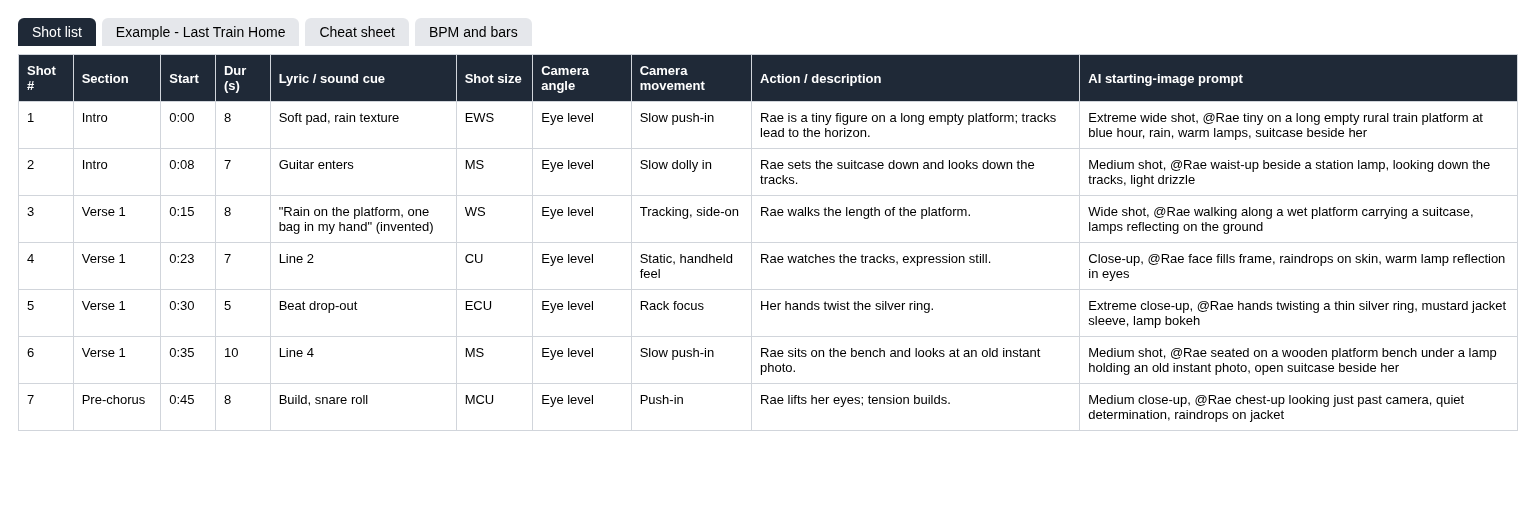
A music video shot list is a numbered table with one row per shot. Each row says where the shot sits in the song, how the camera frames it (size, angle, movement) and what happens in front of the camera. Boords describes a shot list as a numbered table of every shot you plan to film, and StudioBinder names scene number, shot number, description, camera movement and shot size and type as its core elements. This template adds the three things a music video needs on top: the song section with a timestamp, the lyric or sound cue, and an AI prompt for each shot. Download it below as an Excel file, a CSV or a printable PDF, then follow the filled-in example for a 3:30 song.
Key takeawaysOne row per shot, in song order. Give every shot a section (verse, chorus, bridge), a start time and a duration, so the edit lines up with the music.Use the template for filmed and AI videos. The same columns (size, angle, movement, location, talent, props, lighting) work for a camera crew. The two extra AI columns (starting-image prompt, motion prompt) turn each row into a clip.A 3:30 song needs roughly 21 to 42 shots, depending on whether your average shot lasts 10 or 5 seconds. Our worked example uses 24 shots of 5 to 10 seconds.Bar math keeps cuts on the beat. One bar of 4/4 lasts 240 divided by the BPM seconds, so 2.5 seconds at 96 BPM.In Neural Frames, each storyboard scene gets its own starting image (keyframe), and the median storyboard has 10 scenes. Your shot list is the plan you paste into the concept and the per-clip prompts.
Free music video shot list template (download)
Pick the format that fits how you work. All files are free to download and use for your own videos.
- Excel template (.xlsx): four sheets. A blank shot list with drop-downs and an automatic start-time column, the filled-in example, a shot size, angle and movement cheat sheet, and a BPM and bars calculator.
- Blank CSV: 17 columns and 20 empty rows, for Google Sheets, Numbers, Notion or Airtable.
- Filled-in example CSV: the 24-shot "Last Train Home" example from this post.
- Printable PDF: a blank landscape A4 shot list with 12 rows, plus a one-page cheat sheet.
To use it in Google Sheets, upload the .xlsx to Google Drive, or open Google Sheets and choose File, then Import. The drop-downs and the start-time formula should carry over. The CSVs open in any spreadsheet app.
Last updated November 2026.
What each column is for
| Column | What to write | Example |
|---|---|---|
| Shot # | Numbers in edit order, starting at 1 | 9 |
| Section | The part of the song | Chorus 1 |
| Start | Start time. It fills itself in the Excel template from the durations above it | 1:00 |
| Duration (s) | How long the shot stays on screen | 8 |
| Lyric / sound cue | The line or musical moment the shot is tied to | Chorus enters, full band |
| Shot size | How tight the frame is (EWS, WS, MS, MCU, CU, ECU) | WS |
| Camera angle | Where the camera sits | Low angle |
| Camera movement | What the camera does | Slow orbit |
| Location | Where it happens | Platform edge |
| Talent | Who is in the shot | Rae |
| Props | Anything the shot needs | Suitcase |
| Lighting | The light source or mood | Lamp flare behind |
| Action / description | One sentence, plain language | Rae steps to the edge and sings |
| AI starting-image prompt | The keyframe prompt for the shot | Low-angle shot, @Rae towering against dusk sky... |
| AI motion prompt | What moves, in one sentence | Camera orbits a quarter turn, rain falls |
| Notes | Anything the editor or you should remember | Big shot: spend credits here |
| Done | Mark it when the shot is finished | Yes |
If you only shoot with a camera, hide the two AI columns. If you only make AI video, you can hide the crew columns (props, lighting) and fold them into the starting-image prompt.
Shot list vs storyboard vs treatment
These three documents get mixed up. They do different jobs:
| Document | What it is | When you make it |
|---|---|---|
| Treatment | A short written pitch of the idea: story, mood, locations, look | First, before anything else |
| Storyboard | The shots drawn or generated as images, in order, so you can see the video | After the treatment |
| Shot list | A table of every shot with the technical details and timing | Alongside the storyboard, before you shoot or generate |
Boords puts the difference like this: a storyboard shows what each shot looks like, and a shot list says how to capture each shot. In an AI workflow the two blur, because a generated keyframe is the storyboard frame and the shot is made from it. For the full process from concept to export, see How to Make a Music Video in 2026.
Shot sizes, with examples
Shot size is how much of the subject and place fits in the frame. We generated one invented singer, "Rae", and put her in the same train station in six sizes, so you can compare them directly. Rae is a fictional character made with Nano Banana Pro, and she appears throughout this post.
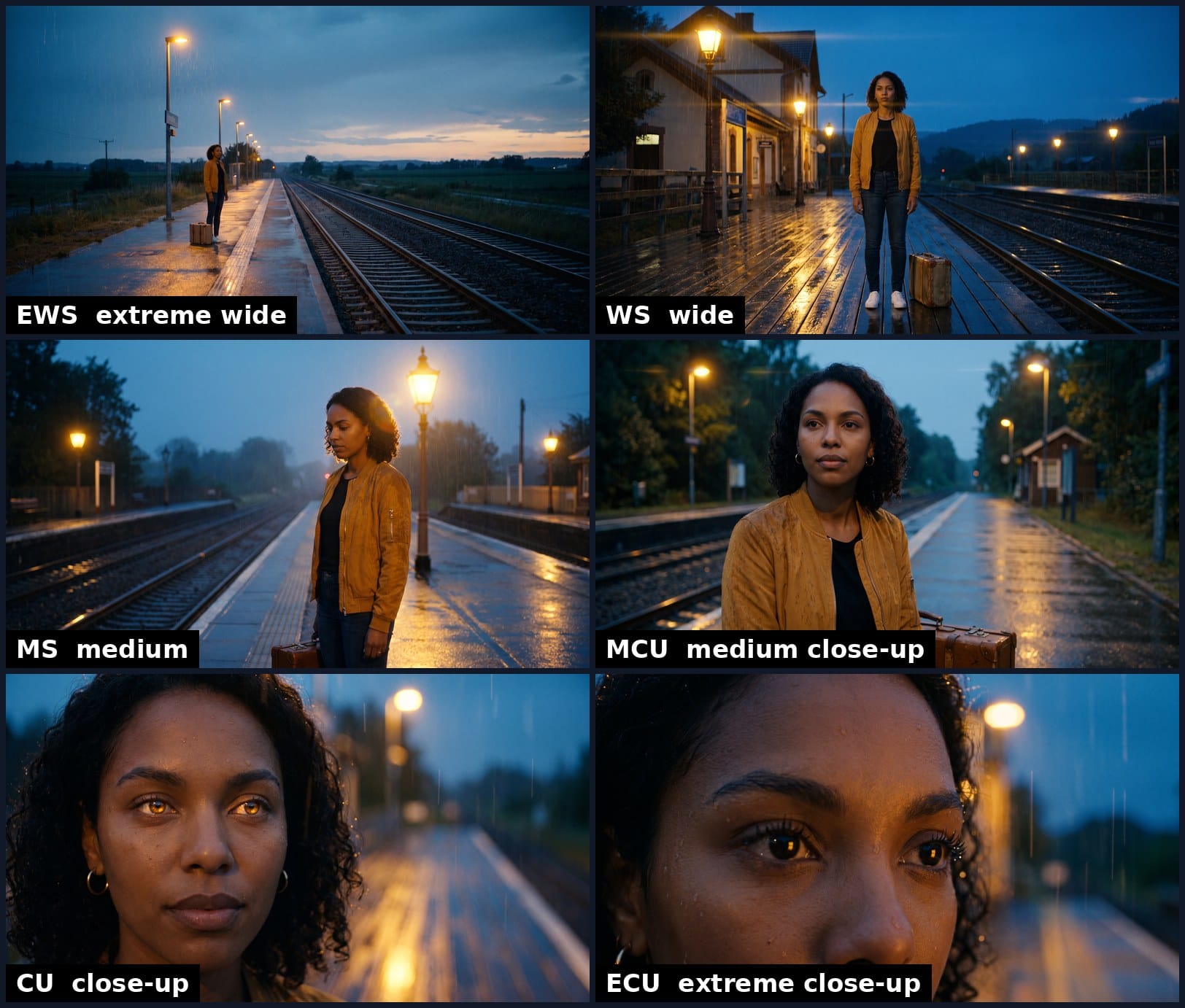
| Abbreviation | Name | What it does in a music video |
|---|---|---|
| EWS | Extreme wide shot | The place dominates and the artist is tiny. Use it to open, to close and to show scale. |
| WS | Wide shot | Head to toe with the surroundings. Shows where the artist is and what they are doing. |
| MS | Medium shot | Waist up. The workhorse for performance and walking shots. |
| MCU | Medium close-up | Chest up. Good for singing, listening and lip-sync. |
| CU | Close-up | The face fills the frame. Emotion, the hook and lip-sync. |
| ECU | Extreme close-up | One detail: eyes, hands, a ring. Use it for beats, transitions and inserts. |
A simple rule: change the shot size when the song changes section. A wide shot into a close-up at the chorus makes the chorus feel bigger without any effect.
Camera angles, with examples
Angle is where the camera sits relative to the subject. The same woman, the same station and four different feelings:
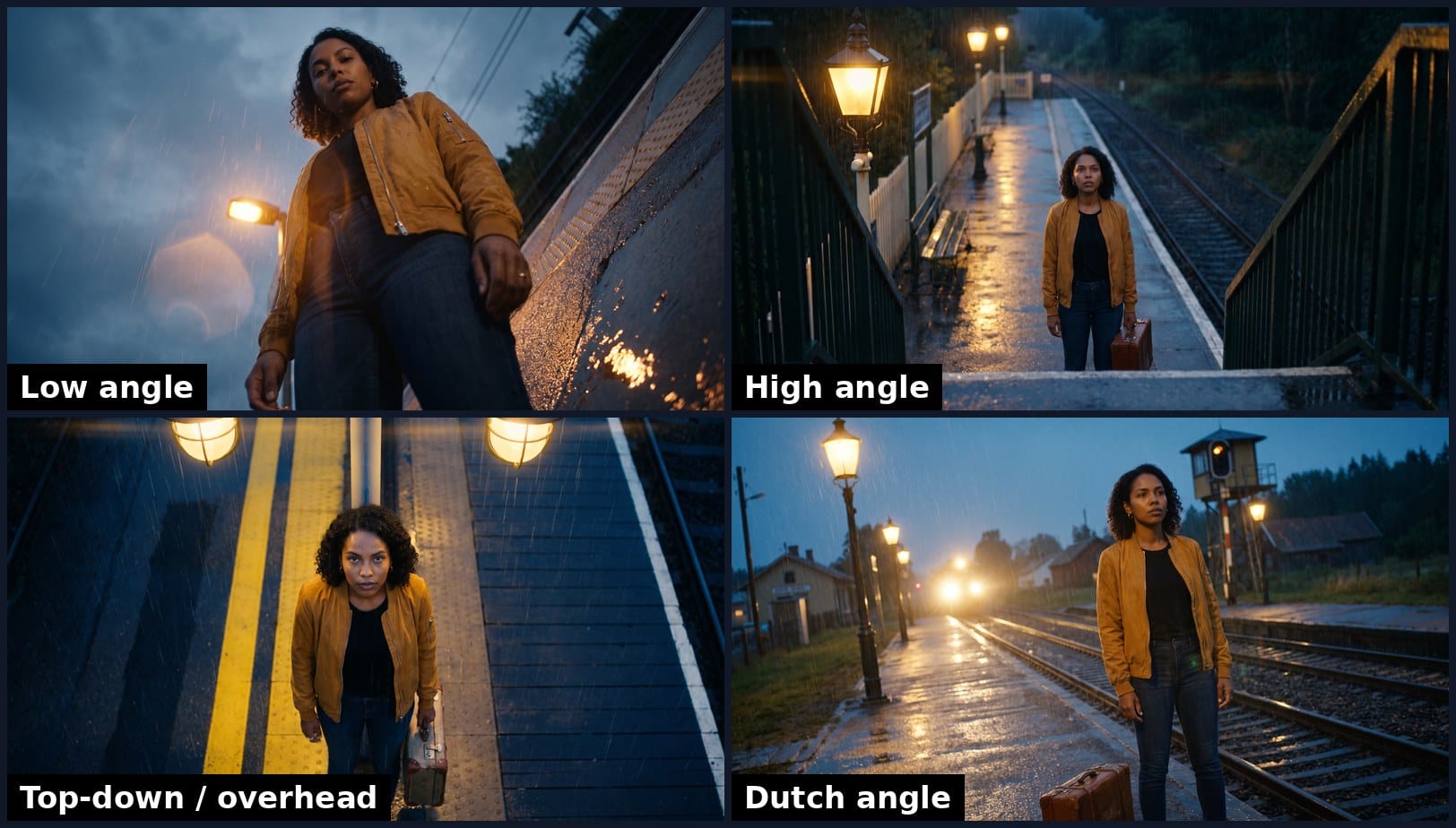
- Low angle: the camera looks up, so the subject feels powerful. Save it for choruses and key lines.
- High angle: the camera looks down, so the subject feels small or alone. It suits a quiet verse.
- Top-down (overhead): a graphic shot that works well on the first beat of a hook.
- Dutch angle: the camera is tilted so the horizon runs diagonally. It signals unease, so use it once, for the emotional turn.
- Eye level: the neutral default, shown as the medium shot in the size examples above.
Camera movements, and which ones suit AI video
| Movement | What it is | Notes for AI video |
|---|---|---|
| Static | The camera does not move | The safe default. The performance or the weather does the work. |
| Push-in | The camera moves toward the subject | The most reliable move. It was the move all nine models in our image-to-video test followed. |
| Pull back | The camera moves away | Good for endings and reveals. |
| Pan and tilt | The camera turns left or right, up or down | Works best slowly. |
| Tracking | The camera travels with the subject | Works when the subject and direction are clear, as in the footbridge clip below. |
| Orbit | The camera circles the subject | Strong for choruses and hero shots. |
| Crane | The camera rises or falls | Good for reveals. |
| Handheld | A slight shake for a documentary feel | Use it sparingly. |
| Rack focus | Focus shifts from one thing to another | Good for inserts such as hands and objects. |
Write one camera move per shot. If you ask for three moves in five seconds, you leave the choice to the model.
How to map your shots to the song structure and BPM
Start from the song, not from the camera. Put the structure on one line, then give each section its shots.
- Find the BPM. Use our free key and BPM finder or the tap tempo tool.
- Convert bars to seconds. In 4/4 time, one bar lasts 240 divided by the BPM, in seconds. The table shows what that gives for common tempos.
- Cut on bar lines. Start each shot on the first beat of a bar and your cuts land on the music.
- Match shots to sections. One section usually holds several shots. A chorus of 12 bars at 96 BPM is 30 seconds, which is three or four shots.
| BPM | One bar | Eight bars | Twelve bars |
|---|---|---|---|
| 80 | 3.0 s | 24.0 s | 36.0 s |
| 96 | 2.5 s | 20.0 s | 30.0 s |
| 120 | 2.0 s | 16.0 s | 24.0 s |
| 128 | 1.9 s | 15.0 s | 22.5 s |
| 140 | 1.7 s | 13.7 s | 20.6 s |
These are our working rules for pacing. They are craft advice, not measured data:
- Open with your widest shot and close with a matching one. A bookend (shot 1 and the last shot framed the same way) makes a video feel finished.
- Save the biggest visual for the first chorus. If the first chorus is the most spectacular moment, the second chorus can repeat it with a variation.
- Use inserts in quiet moments. A hand, a clock or a train light gives the edit a breath between faces.
- Put close-ups on lyrics that matter, and wide shots on instrumental parts.
- Keep screen direction. If the artist walks left to right in shot 3, keep them walking left to right in later shots, or it reads as going back.
How many shots does a music video need?
Divide the length of your song by the average length of a shot. For a 3:30 song (210 seconds):
| Average shot length | Shots needed |
|---|---|
| 4 seconds | 53 |
| 5 seconds | 42 |
| 8 seconds | 26 |
| 10 seconds | 21 |
| 15 seconds | 14 |
Fast edits (rap, dance, EDM drops) sit at the top of that table. Slow songs, lo-fi and ambient videos sit at the bottom. For AI video there is a practical limit too: each clip is generated from one starting image, and single clips from current models run from a few seconds up to 15 seconds, with Kling 4.0 and Seedance 2.5 reaching 30 seconds (see our image-to-video model comparison for the sources).
For a data point from our own product: in the last 90 days, the median Neural Frames storyboard had 10 scenes (289,172 storyboards). That is a leaner plan than the 24-shot example below, so treat the example as the richer end of what you can plan.
Worked example: a 24-shot list for "Last Train Home"
The example song is invented for this post: "Last Train Home", an indie-pop track at 96 BPM, 3:30 long. We wrote the structure, the shots and the cues ourselves, and there are no real lyrics in it. The concept: Rae waits on a rainy platform with a suitcase and an old photo, a train arrives, and she leaves.
Song structure (96 BPM, so one bar is 2.5 seconds and the song is 84 bars):
| Section | Time | Bars | Shots |
|---|---|---|---|
| Intro | 0:00 to 0:15 | 6 | 1 to 2 |
| Verse 1 | 0:15 to 0:45 | 12 | 3 to 6 |
| Pre-chorus | 0:45 to 1:00 | 6 | 7 to 8 |
| Chorus 1 | 1:00 to 1:30 | 12 | 9 to 12 |
| Verse 2 | 1:30 to 2:00 | 12 | 13 to 15 |
| Chorus 2 | 2:00 to 2:30 | 12 | 16 to 18 |
| Bridge | 2:30 to 2:50 | 8 | 19 to 20 |
| Final chorus | 2:50 to 3:20 | 12 | 21 to 23 |
| Outro | 3:20 to 3:30 | 4 | 24 |
We generated fifteen of the 24 shots as keyframes with Nano Banana Pro, using one character sheet so Rae looks the same in all of them (see Consistent Characters in AI Music Videos for how that works in Neural Frames):
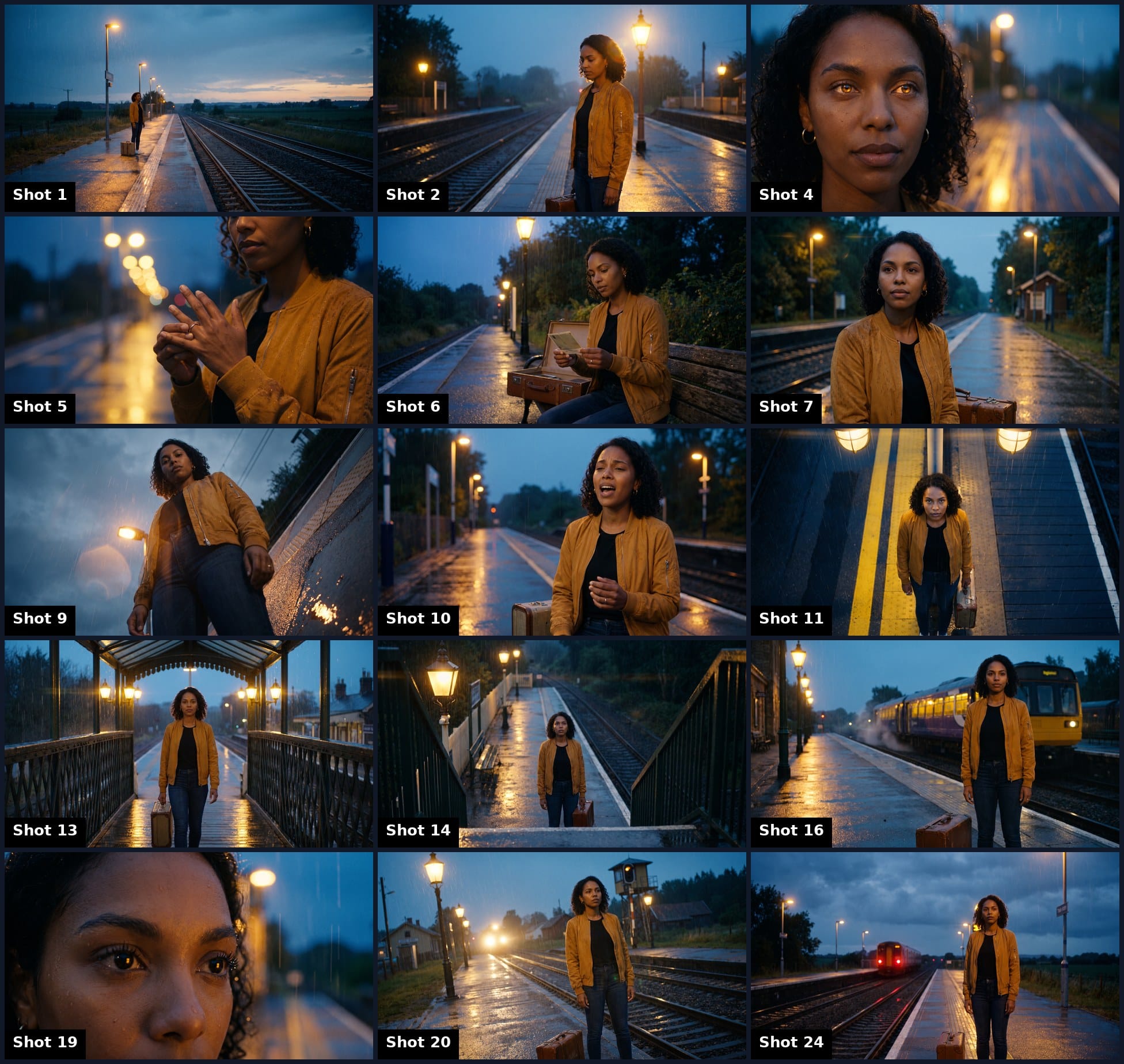
And here is the filled-in shot list. The downloadable files also contain the lyric cue, location, props, lighting, notes and both AI prompts for every shot.
| Shot | Start | Section | Size, angle, movement | What happens | Sec |
|---|---|---|---|---|---|
| 1 | 0:00 | Intro | EWS, eye level, slow push-in | Rae is a tiny figure on a long empty platform; tracks lead to the horizon. | 8 |
| 2 | 0:08 | Intro | MS, eye level, slow dolly in | Rae sets the suitcase down and looks down the tracks. | 7 |
| 3 | 0:15 | Verse 1 | WS, eye level, tracking, side-on | Rae walks the length of the platform. | 8 |
| 4 | 0:23 | Verse 1 | CU, eye level, static, handheld feel | Rae watches the tracks, expression still. | 7 |
| 5 | 0:30 | Verse 1 | ECU, eye level, rack focus | Her hands twist the silver ring. | 5 |
| 6 | 0:35 | Verse 1 | MS, eye level, slow push-in | Rae sits on the bench and looks at an old instant photo. | 10 |
| 7 | 0:45 | Pre-chorus | MCU, eye level, push-in | Rae lifts her eyes; tension builds. | 8 |
| 8 | 0:53 | Pre-chorus | WS, eye level, pan | A train light appears far down the tracks. | 7 |
| 9 | 1:00 | Chorus 1 | WS, low angle, slow orbit | Rae steps to the platform edge and sings. | 8 |
| 10 | 1:08 | Chorus 1 | MCU, eye level, push-in | Rae sings the hook to camera. | 7 |
| 11 | 1:15 | Chorus 1 | Overhead, top-down, slow rotate | Rae stands on the yellow safety line looking up. | 7 |
| 12 | 1:22 | Chorus 1 | CU, eye level, push-in | Rae sings the last line. | 8 |
| 13 | 1:30 | Verse 2 | WS, eye level, tracking backward | Rae walks toward camera across a covered footbridge. | 10 |
| 14 | 1:40 | Verse 2 | High angle, looking down, static | Rae stands alone on the empty platform below. | 10 |
| 15 | 1:50 | Verse 2 | CU, eye level, static | Rae holds the photo with both hands. | 10 |
| 16 | 2:00 | Chorus 2 | WS, eye level, orbit | The train arrives behind Rae. | 10 |
| 17 | 2:10 | Chorus 2 | MCU, eye level, push-in | Rae sings, lit by the train. | 10 |
| 18 | 2:20 | Chorus 2 | CU, eye level, slow push-in | Rae sings the final line of chorus 2. | 10 |
| 19 | 2:30 | Bridge | ECU, eye level, slow-motion static | Rae closes her eyes as rain falls on her face. | 10 |
| 20 | 2:40 | Bridge | WS, dutch angle, slow push-in | The platform tilts as Rae turns toward the train. | 10 |
| 21 | 2:50 | Final chorus | WS, eye level, crane up | Doors open and light spills onto the platform. | 10 |
| 22 | 3:00 | Final chorus | MCU, eye level, push-in | Rae sings the last hook with a small smile. | 10 |
| 23 | 3:10 | Final chorus | MS, eye level, tracking | Rae steps onto the train. | 10 |
| 24 | 3:20 | Outro | EWS, eye level, pull back | The train leaves; the platform is empty. | 10 |
A few choices worth copying:
- Shots 1 and 24 are bookends. Both are extreme wide shots of the empty platform, one at the start and one after the train leaves.
- Lip-sync shots are medium close-ups and close-ups (shots 10, 12, 17, 18 and 22). Faces are large enough for lip-sync to read, and the wide shots stay free of it.
- The pre-chorus is tight and the chorus opens wide. Shot 7 is a medium close-up and shot 9 is a low-angle wide shot, so the chorus feels bigger without any effect.
- One Dutch angle (shot 20), used once, for the emotional turn in the bridge.
- Shot 9 is marked "spend credits here". When a budget is tight, spend it on the first-chorus shot and the train arrival.
Here are three of the rows with their AI prompts, as they appear in the template:
| Shot | AI starting-image prompt | AI motion prompt |
|---|---|---|
| 9 (Chorus 1, WS, low angle) | Low-angle shot, @Rae towering against dusk sky and glowing platform lamp, wet reflections in foreground | Camera orbits a quarter turn, lamp flares, rain |
| 16 (Chorus 2, WS) | Wide shot, a regional train with glowing yellow windows pulls into the platform behind @Rae, light spilling over the wet platform | The train rolls in slowly, headlights sweep, steam |
| 10 (Chorus 1, MCU) | Medium close-up, @Rae singing with emotion, mouth open mid-note, warm lamp light on face | Slow push-in, subtle sway |
From shot list to actual shots: four clips
A shot list is only useful if each row turns into a shot. We took four of the keyframes above and animated each one into a 5-second clip with a different video model, using the motion prompt from its row. These are single takes with sound turned off, run on Fal. For a fuller comparison of nine models, see our image-to-video test.
Shot 10 (MCU, push-in), Kling O3 Pro. Rae sings with her eyes closed and her hands together, and the camera pushes in slightly. The mouth moves, but this is not lip-sync to a track. For a real vocal you would use the Vocal Video technique, covered in How to Make a Lip-Sync AI Music Video.
Shot 9 (WS, low angle, orbit), Gemini Omni Flash 1.2. The camera swings round her from below, the lamp flares and she turns her head toward the lens. This was the biggest camera move of the four.
Shot 16 (WS, train arrives), MiniMax H3 Max. The train rolls into the platform behind her while she stays still and looks at the camera. It was the cheapest of the four to run.
Shot 13 (WS, tracking backward), Kling 4.0. She walks toward the camera across the footbridge while the camera tracks backward. The lamps pass by on both sides. The suitcase drops out of the bottom of the frame as she gets close.
What this shows about shot lists: the camera move and the framing came from the row, and each model followed them. The results depend on the keyframe.
Genre examples: four short shot lists
Different genres need different shots. Each of these shows six rows of a shot list for a fictional video. All images are generated with Nano Banana Pro.
Rap and performance video
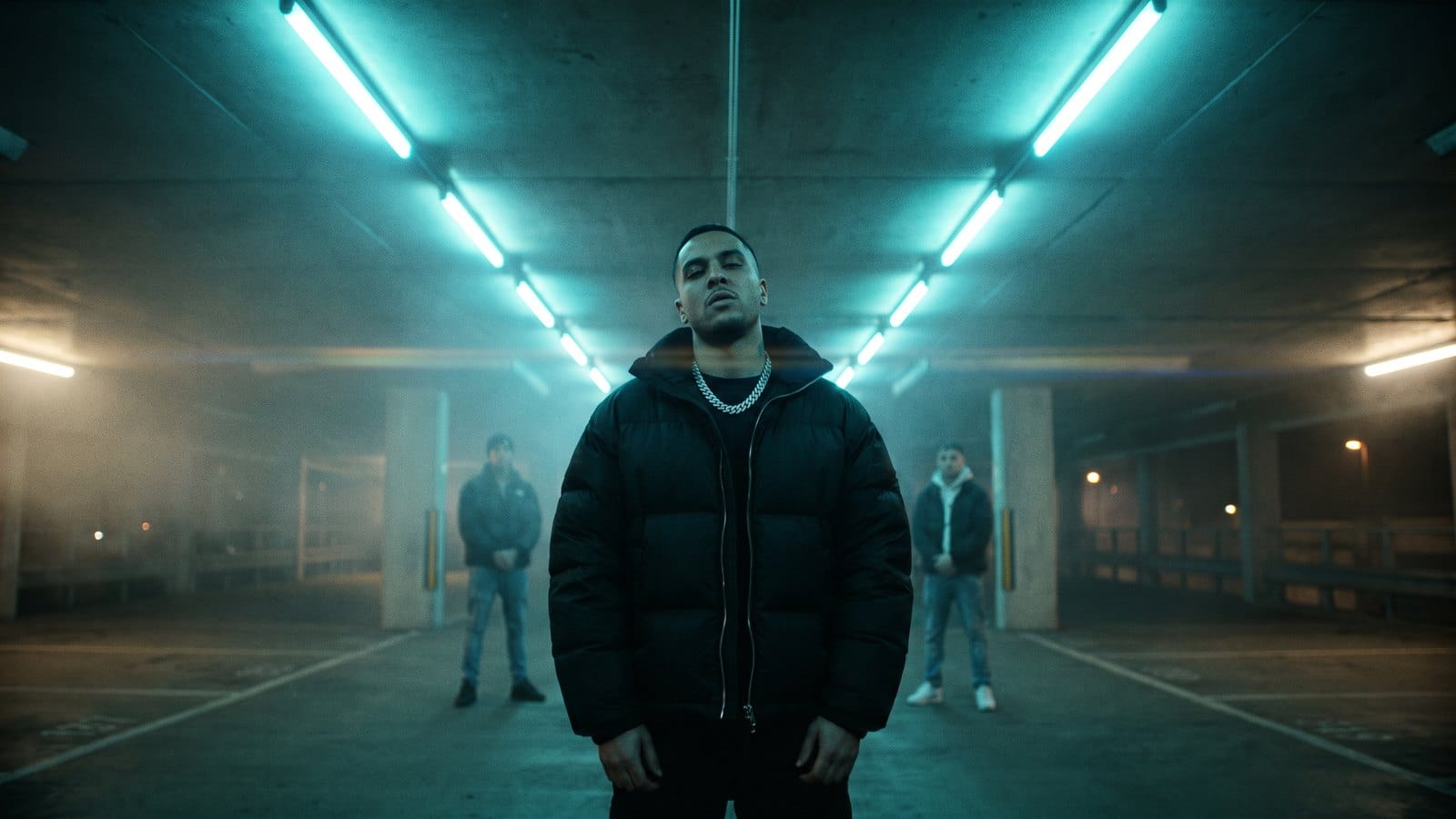
| Shot | Size | Angle | Movement | What happens |
|---|---|---|---|---|
| 1 | WS | Low angle | Static | Artist stands in the centre of an empty parking garage, neon tubes converge overhead. Start on the first bar of verse 1. |
| 2 | MCU | Eye level | Slow push-in | Rap straight to camera on a punchline. |
| 3 | ECU | Eye level | Rack focus | The chain swings into focus as the beat drops. |
| 4 | WS | Eye level | Orbit | Friends walk in behind the artist. The camera circles at the chorus. |
| 5 | MS | High angle | Handheld | Artist walks toward camera through haze in verse 2. |
| 6 | CU | Low angle | Static | Last bar: the stare. Cut to black on the final kick. |
Performance videos live on the lip-sync shots. Plan more MCUs and CUs than in a narrative video, and keep the location simple so the artist is the focus. At 90 BPM, one bar lasts 2.7 seconds, so a 16-bar verse is 43 seconds, which is about 9 to 11 shots at 4 to 5 seconds each.
Indie narrative video
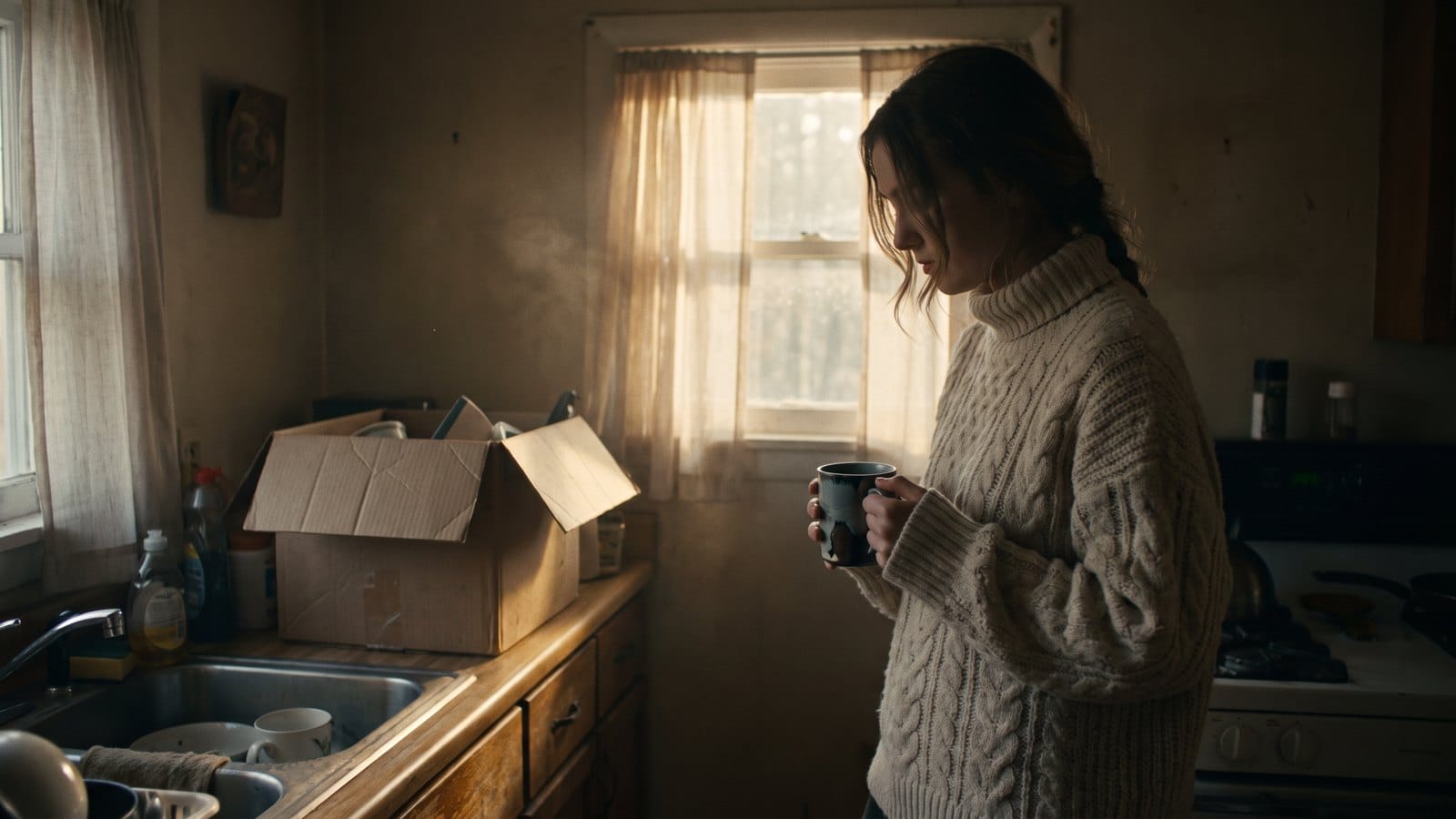
| Shot | Size | Angle | Movement | What happens |
|---|---|---|---|---|
| 1 | WS | Eye level | Static | A kitchen with half-packed boxes in soft morning light. |
| 2 | MS | Eye level | Handheld | She holds a mug at the window, seen from behind her shoulder. |
| 3 | ECU | High angle | Static | A hand tapes a box shut. |
| 4 | CU | Eye level | Slow push-in | Her face as the chorus lifts. |
| 5 | WS | Eye level | Tracking | She walks down the hallway with the box. |
| 6 | EWS | Eye level | Static | The street outside as the door closes. |
Narrative videos need continuity: the same character, the same clothes and the same props across scenes. Build the character once and tag it in every prompt, as in our consistent characters guide.
EDM and visualizer video
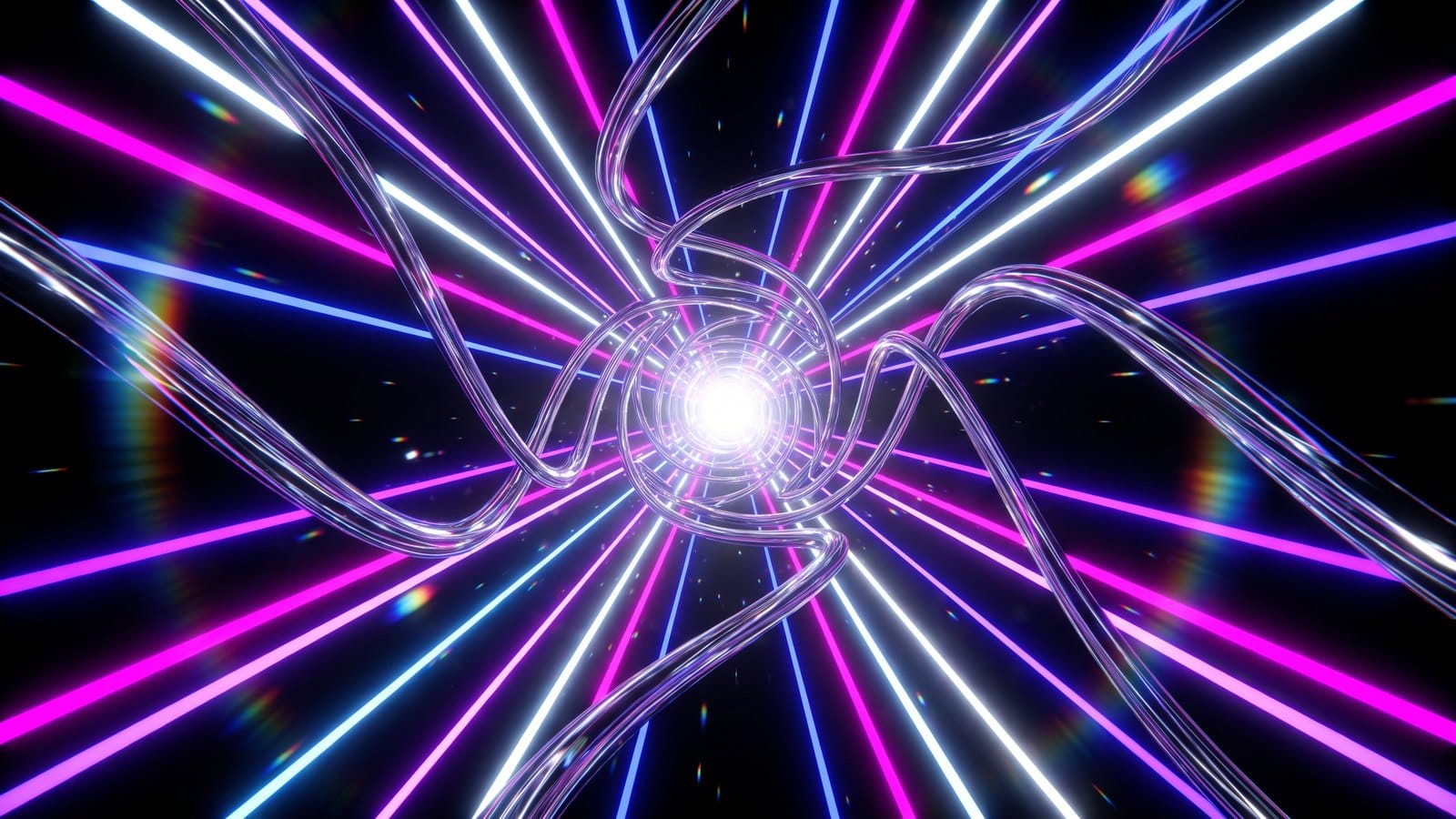
| Shot | Size | Angle | Movement | What happens |
|---|---|---|---|---|
| 1 | WS | Eye level | Static | A symmetrical tunnel of light on the intro. |
| 2 | WS | Eye level | Push-in | The camera flies through the tunnel, faster as the build rises. |
| 3 | ECU | Eye level | Static | Macro of the chrome ribbons on the snare roll. |
| 4 | Mixed | Mixed | Cuts | A burst of 1 to 2 second shots on the drop, one per beat. |
| 5 | WS | Eye level | Orbit | The camera circles the central light in the breakdown. |
| 6 | WS | Eye level | Pull back | The whole structure revealed on the outro. |
With no performer, the shot list is about energy. Use short shots on the drop and long shots on the build. If you want visuals that react to the audio directly instead of planned shots, try the audio visualizer.
Lo-fi and loop video
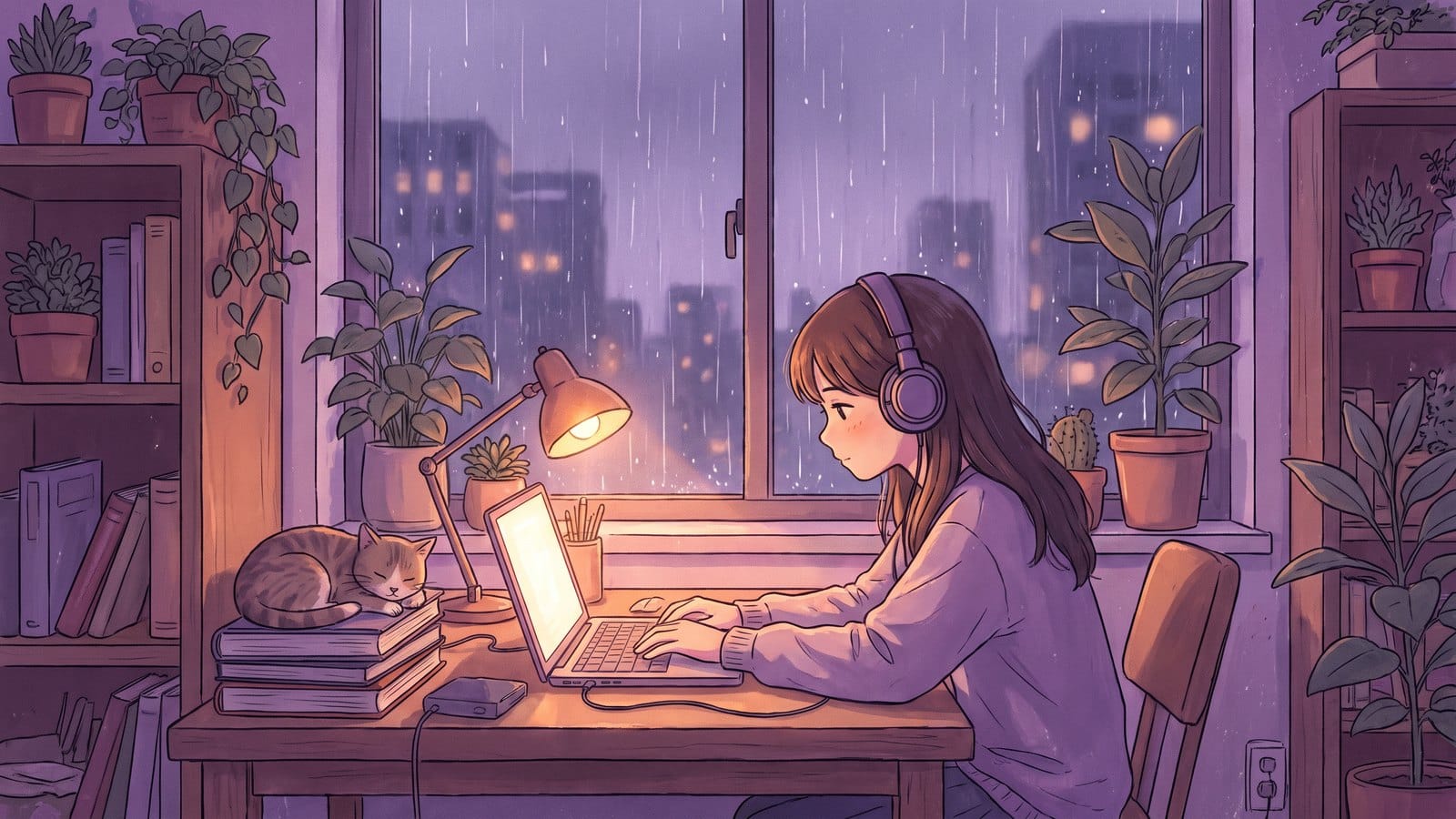
| Shot | Size | Angle | Movement | What happens |
|---|---|---|---|---|
| 1 | WS | Eye level | Static | The room, the rainy window, the lamp. |
| 2 | MS | Eye level | Static | The girl types at the desk. |
| 3 | CU | Eye level | Static | The cat sleeping on the books. |
| 4 | ECU | High angle | Static | A hand on the keyboard. |
| 5 | MS | Eye level | Slow push-in | Slowly toward the window and the rain. |
| 6 | WS | Eye level | Static | The same as shot 1, so the video loops. |
Lo-fi videos are slow and long, so a short shot list is enough. Make the last shot match the first so the video can loop. For vertical versions, see short-form music videos with AI.
Use your shot list in Neural Frames
In the Neural Frames AI music video generator, Autopilot starts from your song and creates a storyboard of scenes. Each scene gets a starting image (keyframe), and a video model animates it. Your shot list tells you what you want, and these are the places to put it.
| Shot list column | Where it goes in Neural Frames |
|---|---|
| The summary of all shots | The Video Concept box on the Track page |
| Talent | A saved Character, tagged with @Name in prompts |
| Technique (performance, narrative, lyric) | Classic Video, Lyric Showcase or Vocal Video |
| Location, props, lighting, action | The starting-image prompt of each clip |
| Camera movement | The motion prompt of each clip |
| Lip-sync marks | The Lip Sync option on a clip (next to Cut and Blend) |
| Notes | Your own checklist. Compare it with the scene cards on the Storyboard page |
The steps:
- Upload your song. Autopilot reads it and shows the waveform, so you can check your timestamps against the real song.
- Write the Video Concept in two or three sentences from your treatment. You can leave it blank and let the AI generate concepts, or use "NO:" to exclude things.
- Create your character from 1 to 10 photos (or a text description) and add it to the project.
- Pick a technique. Classic Video gives the most varied framing. Vocal Video frames shots for lip-sync.
- Compare the Storyboard to your shot list. If you change the concept, use Regenerate Scenes. You can also regenerate individual scenes.
- Start Production and check the keyframes. Use Recreate Starting Image for big changes and Edit Starting Image for small ones.
- Paste your per-shot prompts into the starting-image and motion boxes, and set Cut, Blend or Lip Sync per clip.
- Render. You cannot pause or cancel a render once it starts, so the keyframe check is your last chance to change a shot.
The Help Center Autopilot handbook covers each step in more detail. To turn a screenshot or a reference frame into a starting prompt, use the free image-to-prompt tool. For a sense of what a full video costs in credits, see How Much Does a Music Video Cost?. Our image model guide helps you choose the model for your keyframes, and 10 Tips for Better AI Music Videos covers common mistakes.
Neural Frames is free to start with no credit card: try the AI music video generator.
Common shot list mistakes
- No timestamps. A list of shots without times cannot be checked against the song.
- Every shot the same size. A video of 24 close-ups feels as flat as 24 wide shots. Mix them.
- No inserts. Hands, objects and places let the edit breathe between faces.
- Lip-sync on wide shots. Faces in wide shots are tiny, which gives blurry or melting results. Put lip-sync on waist-up shots, portraits and close-ups.
- Too many locations. Each location needs its own look and keyframes. Three or four locations are enough for most videos.
- Ignoring screen direction. Keep the artist moving the same way across shots.
- Three camera moves in one shot. One move per shot. Add variety by changing the move between shots.
- Skipping the end frame. Know how each shot ends, so the next shot can begin from it. Our users rendered clips from an uploaded end keyframe 4,390 times in the last 90 days.
More ideas for what to film or generate are in 99 Creative Music Video Ideas, and prompt wording from our community is in Writing the perfect AI prompts.
FAQ
What is a music video shot list?
A music video shot list is a numbered table with one row per shot. Each row records the song section and timestamp, the shot size, camera angle and movement, the location, who is in the shot and what happens. It is the checklist you work through on a shoot or while generating clips.
What should a music video shot list include?
At minimum, a shot number, the song section, a start time, a duration, a one-line description, the shot size, the camera angle and the camera movement. Most shot lists also add the lyric or sound cue, location, talent, props and lighting. For AI video, add the starting-image prompt and the motion prompt for each shot.
How many shots does a 3-minute music video need?
It depends on your average shot length. A 3:30 song of 210 seconds needs about 21 shots at 10 seconds each, 26 at 8 seconds, 42 at 5 seconds and 53 at 4 seconds. Slow songs use fewer, longer shots. Rap and dance videos use more, shorter ones.
What is the difference between a shot list and a storyboard?
A storyboard shows what each shot looks like, as a sequence of images. A shot list says how to capture each shot, as a table with shot size, angle, movement and timing. Most productions use both: the storyboard to agree the look, and the shot list to run the shoot. In an AI workflow, the generated keyframes work as the storyboard.
How do I make a music video shot list in Google Sheets?
Download our .xlsx template and upload it to Google Drive, or open Google Sheets and use File, then Import. Delete the example rows, then add one row per shot in song order. Put each section's name and the duration in the first columns, and the start times fill in automatically from the durations. Or open the blank CSV in Google Sheets instead.
How do I match shots to the BPM?
Divide 240 by the BPM to get the length of one bar in seconds, for 4/4 time. At 96 BPM that is 2.5 seconds, so an eight-bar section lasts 20 seconds. Start each shot on the first beat of a bar and cuts land on the music. Our free key and BPM finder gives you the tempo of your track.
Do I need a shot list for an AI music video?
You do not need one, because Autopilot can write a storyboard from your song. A shot list is still worth making when you want control: it tells you how many shots you need, where the biggest shots go, which shots need lip-sync, and what each motion prompt should say. It also stops you spending credits on shots you have not planned.
Can AI write a music video shot list for me?
Partly. In Neural Frames, Autopilot reads your song and writes a storyboard of scenes with starting images, which works like a first-draft shot list. You can then edit the concept, regenerate scenes, and change the prompts for each clip. A shot list you write yourself gives you more control over framing, timing and camera moves.