How to Make Short-Form Music Videos with AI: A 4-Step Guide for Independent Artists
Short-form clips are how most people find new music now. Here is how to make them with AI, which part of the song to use, the specs for each platform, and the rules on AI labels.
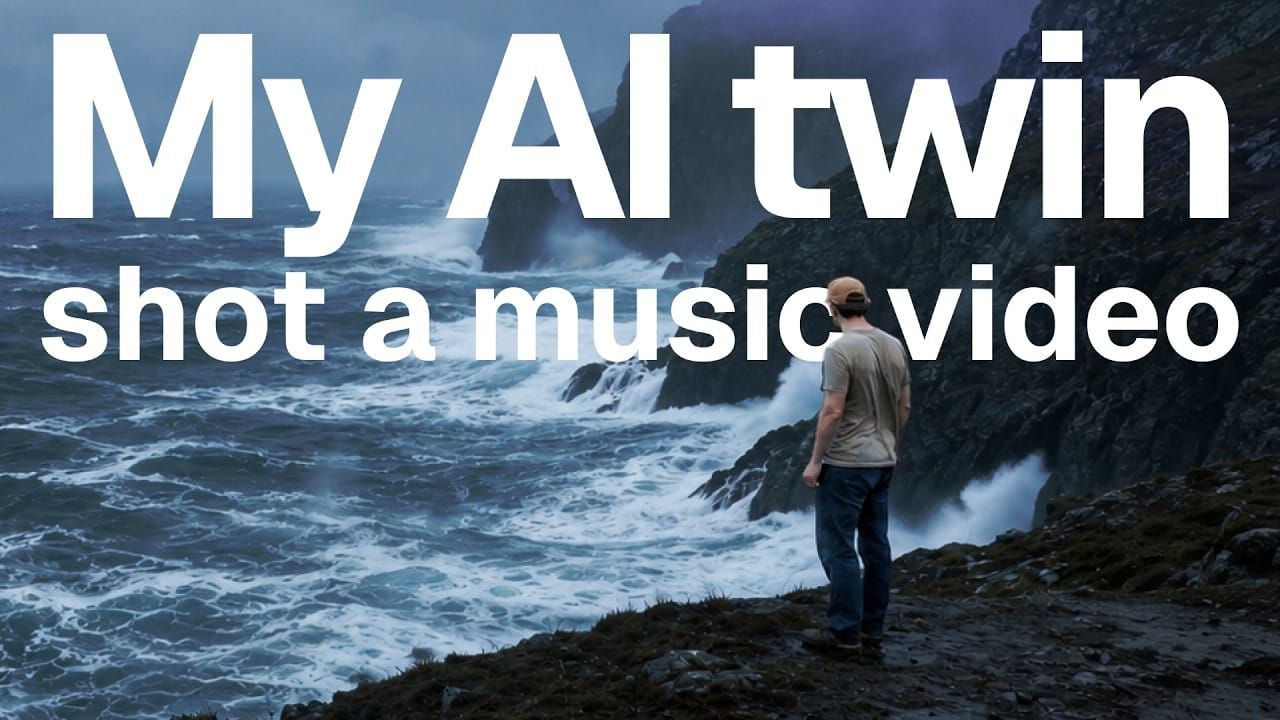
To make a short-form music video with AI, pick a visual world that fits the mood of your song, choose a 15–60 second section (usually the hook or the first vocal line), add a character built from a few photos of yourself, then generate, review and export the clip in vertical 9:16. Before you post, label it as AI-generated if it looks realistic. TikTok, Instagram and YouTube all ask for that.
This guide follows a real example. Irish singer-songwriter Conor Ef turned 30 seconds of his song "Trip When He's Falling" into a moody, rain-soaked clip on an Irish cliff, without leaving the room. After the walkthrough, we answer the questions artists ask most about short-form video: length, format, which part of the song to use, AI labels, ownership and how often to post.
Video: "Better Short-Form Content For Your Music: 4 Steps" by Neural Frames, with Conor Ef, published August 4, 2026. Interface details are as of the recording.
Key takeawaysShort-form video is now the main discovery channel for new music. In TikTok's 2026 Music Impact Report, 94% of songs that entered the Billboard Global 200 in 2025 went viral on TikTok first.Use a 15–60 second section built around your strongest moment, and make the first few seconds count.Export vertical 9:16. TikTok, Reels and Shorts all accept clips up to about three minutes, but YouTube blocks Shorts over one minute that carry a copyright claim.Photorealistic AI video, including an AI version of you in a place you never visited, should carry an AI label on TikTok, Instagram and YouTube.Consistency beats volume: Buffer's data shows the biggest gain comes from posting 2–5 times a week instead of once.
Why does short-form video matter so much for musicians?
Short-form video is where listeners discover new artists. A song that never gets a visual has a much harder time reaching anyone outside your existing fans.
Conor opens the video with the problem many independent artists know: "Many of [my songs] didn't perform as I'd hoped they would. I think partly because they didn't have visuals to accompany them."
The data backs him up. TikTok's 2026 Music Impact Report, commissioned by TikTok and prepared by Luminate, found that:
- 94% of songs that entered the Billboard Global 200 in 2025 went viral on TikTok first, up from 84% in 2024.
- Songs with a viral TikTok moment spent four times longer on that chart than songs without one.
- 45% of U.S. TikTok users discover new music and artists on the platform, more than on any other major social platform.
Keep in mind that the report was commissioned by TikTok, so it naturally highlights TikTok. Still, the pattern matches what artists see on Reels and Shorts too: people find songs through short clips, then go to streaming services to hear the whole thing.
The hard part is volume. As Conor puts it, it's "harder for independent artists to create this kind of never-ending stream of short-form and long-form content." That's the gap AI tools try to fill.
How do you make a short-form music video with AI?
The process has four steps: choose a look, choose the section of the song, add a character, then generate and review. Here is how Conor did each one in Neural Frames' Short-Form Studio. Most AI music video tools follow a similar order.
Step 1: Pick a visual world that matches the song's mood
Start from the feeling of the song, not from whatever looks coolest. Short-Form Studio opens with a grid of templates such as Liminal Spaces, Emotional Singing and an "I'm Feeling Lucky" option that picks a style for you.
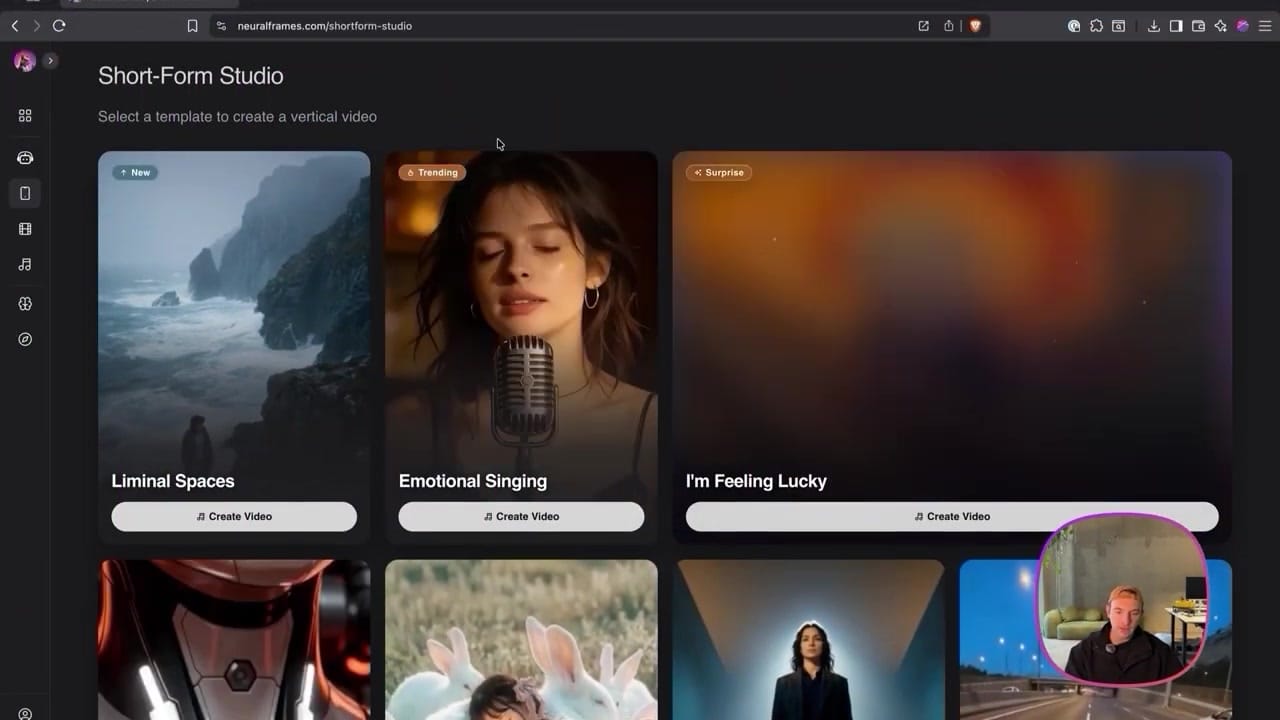
Conor skipped the anime-style templates ("my style isn't necessarily this kind of cartoonish anime style") and went for a rainy cliffside look because it reminded him of home: "My music is kind of introspective and moody... So, I feel like this fits really well."
Tip: Write down three words that describe your song (for example grey, lonely, coastal) before you browse styles. It stops you from choosing a look that clashes with the music.
Step 2: Choose the 15–60 seconds of the song you want to use
Upload the track and drag across the waveform to select a section. In the version shown in the video, the selection has to be between 15 and 60 seconds, and the lyrics for the selected section are shown below the waveform.
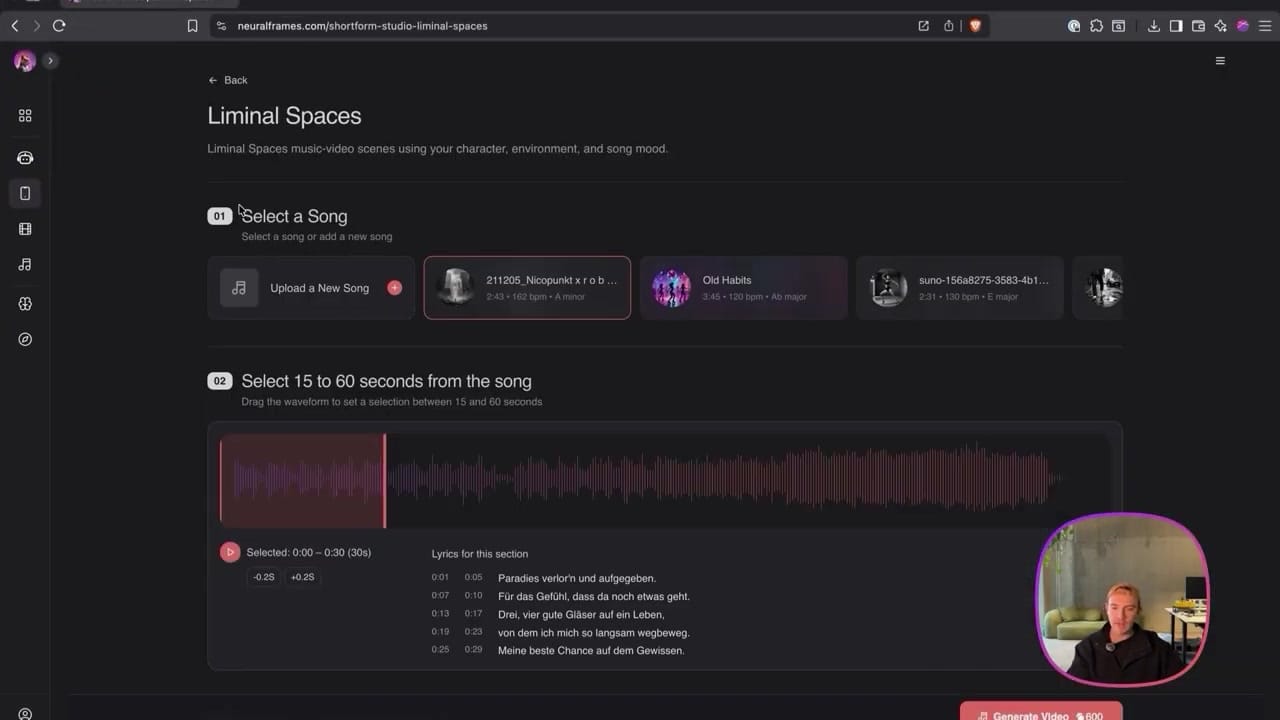
Conor started his clip at 0:15, "when I start singing," and kept 30 seconds. More on choosing the right section below.
Step 3: Put yourself in the video with a few photos
You can pick a ready-made character, describe one, or upload photos of yourself. Conor uploaded three: one front-facing, one from the side and one moody shot he liked the lighting in. He left the optional description empty.
The tool turned them into a character sheet showing him from several angles. "It actually really looks like me," he says. "He's literally wearing exactly what I'm wearing right now. The hat and everything." You can rename the character (it first called him "Elias") and reuse it in later videos.
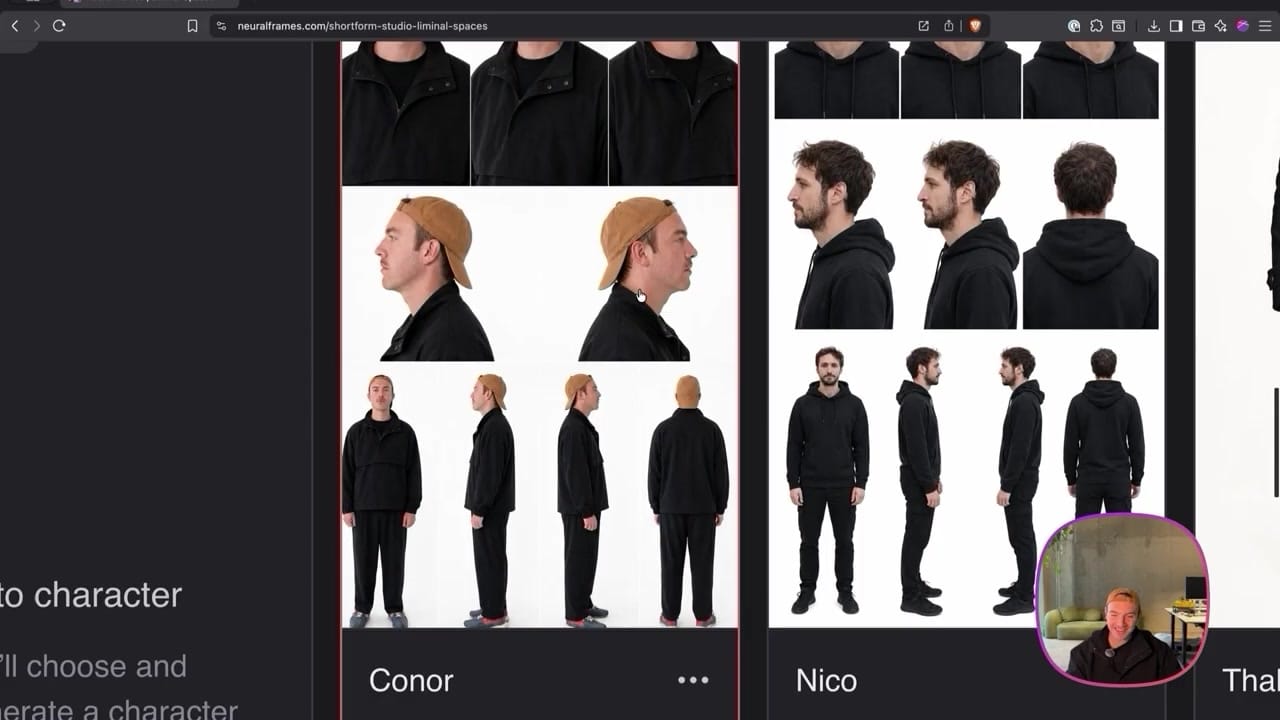
Then pick an environment. Conor looked at liminal parking lots and a Miami-style ocean view, then chose "Storm Veil," a stormy sea cliff.
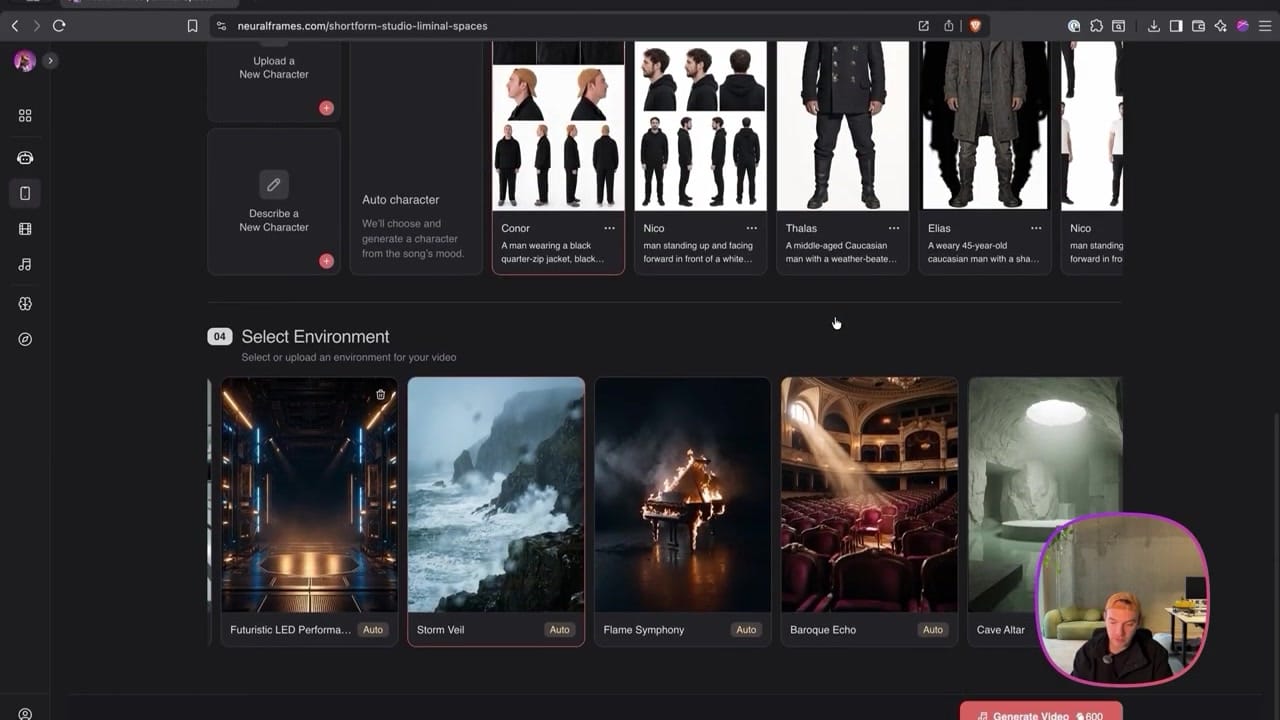
Step 4: Generate, review every clip, then download
Hit Generate. The result page shows a preview on the left and the individual clips on the right, each with a short description of what happens in the shot.
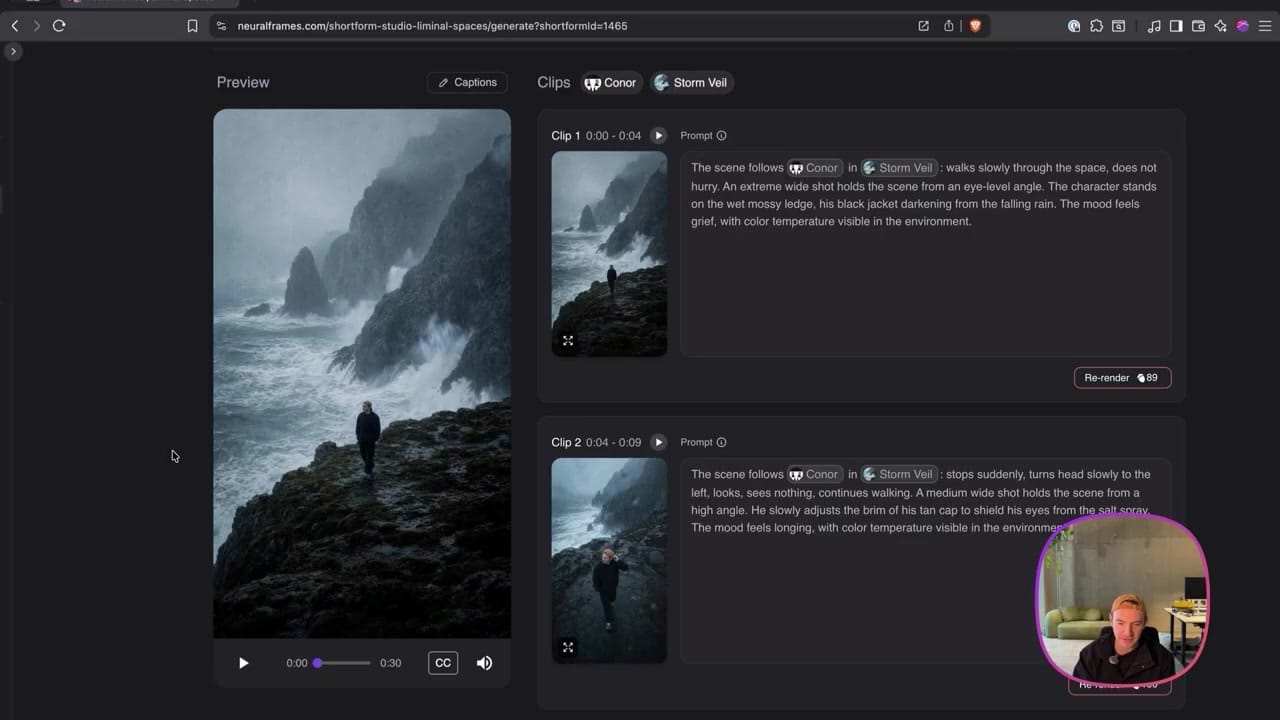
Watch the whole preview with sound and check:
- Likeness. Does the face hold up in close-ups? Conor pointed out that the skin "doesn't necessarily have this AI gloss," with freckles and fine lines intact.
- Mood. Does the motion fit the tempo and feel of the section?
- Weak shots. You can edit a clip's prompt and re-render just that clip instead of the whole video.
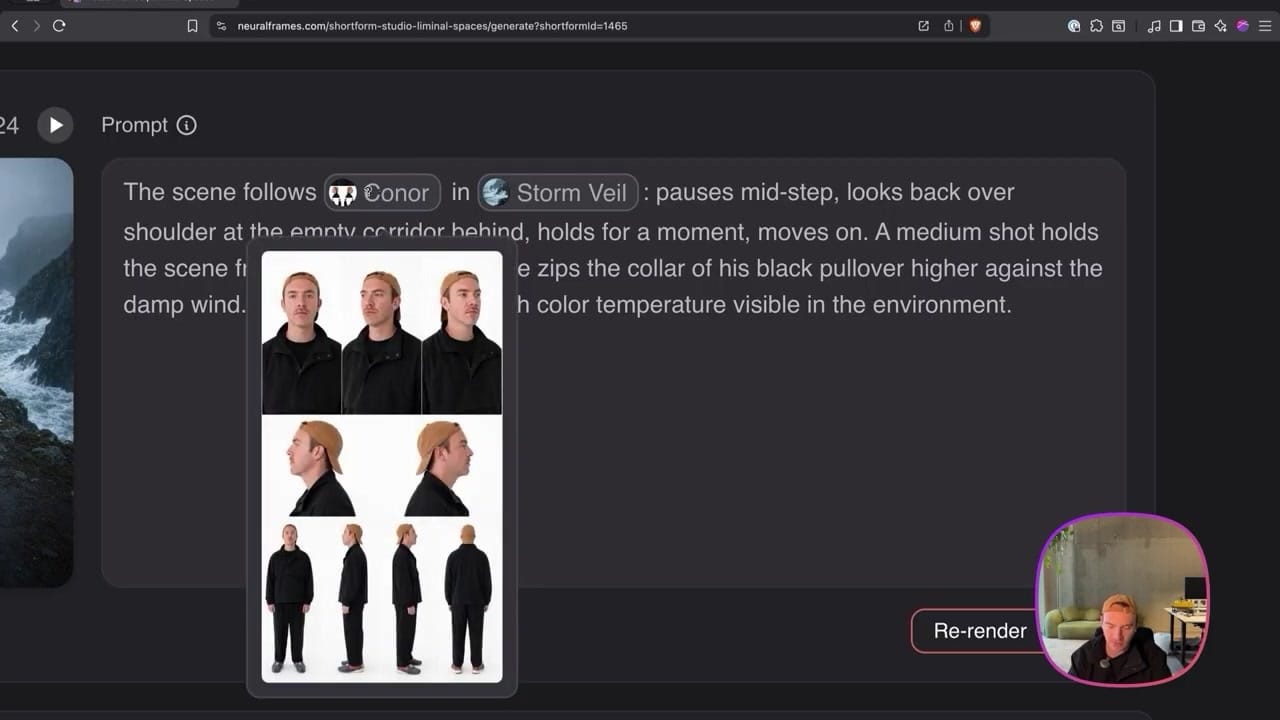
Conor was happy with his first result, downloaded it and posted it. His verdict on what the AI version replaced: a real shoot on that cliff would have needed travel and "a lot of artificial lighting" on a grey day, and the tool "can just save so much time, so much money, and so much effort and planning."
Which part of my song should I use for a short-form video?
Use the section that hooks people fastest: usually the chorus, the first vocal line or the most quotable lyric. Avoid long instrumental intros unless the intro is the hook.
The first seconds matter because that is when viewers decide whether to keep watching. TikTok's own Creative Codes guide says "the first six seconds are vital" and cites research that 90% of ad recall impact happens within the first six seconds. That research is about ads, not songs, but the lesson carries over: don't make people wait for the good part.
A practical approach:
- Make two or three versions from different sections (chorus, first verse line, bridge).
- Post them a few days apart.
- Keep the section that holds attention best and make more clips from it.
Conor's choice is a good default: start right where the vocal comes in, so there is something to hold onto from the first second.
How long should a short-form music video be?
Between 15 and 60 seconds works on every major platform and keeps you clear of the YouTube copyright rule below. All three big platforms now accept clips of up to about three minutes, but shorter clips loop more and are easier to finish.
| Platform | Maximum length | Format | Note for musicians |
|---|---|---|---|
| YouTube Shorts | 3 minutes | Square or vertical | Shorts over 1 minute with any copyright claim are blocked globally. Max upload resolution is 1080p. |
| Instagram Reels | 3 minutes | Vertical 9:16 | Raised from 90 seconds in January 2025. |
| TikTok | At least 3 minutes | Vertical 9:16 | TikTok has allowed 3-minute videos since 2021. |
| Spotify Canvas | 3–8 seconds | Vertical 9:16, 720–1080 px tall, MP4 or JPG | A looping visual, not a music video. Spotify advises against singing or rapping in it, since the loop won't sync with the lyrics. |
The YouTube copyright catch: if your distributor registers your song with YouTube's Content ID, your own Short may get a claim. Under YouTube's rules, a claimed Short longer than one minute "will be blocked globally" until the claim is resolved. Keep Shorts under 60 seconds, or check with your distributor before you post longer ones.
What aspect ratio should a short-form music video be?
Use vertical 9:16 (for example 1080 × 1920). It fills the phone screen on TikTok, Reels and Shorts. YouTube also counts square videos as Shorts, but vertical is the safer choice everywhere.
If you already have a horizontal 16:9 music video, you can crop or reframe it into vertical clips. Many editors do this, and so does Neural Frames' horizontal-to-vertical conversion. Check that faces and any text stay inside the frame, because the platforms' buttons and captions cover the edges and bottom of the screen.
Can AI put me in a music video without a film shoot?
Yes. Current tools can build a consistent character from a few ordinary photos and place it in scenes you never filmed. Conor used three photos, and the result kept his face, cap, jacket and even his sneakers across every clip.
For best results:
- Use clear, well-lit photos with your face visible.
- Include different angles: front, side and three-quarter.
- Wear the outfit you want to see, or describe it in the character description.
- Only upload photos of yourself, or of people who agreed to it.
Want your character to sing on screen? Our lip-sync music video guide covers which photos and shots sync best, and our 10 tips for better AI music videos explain how to keep a character consistent.
Is an AI music video better than filming one yourself?
Neither is always better. AI is faster and cheaper for frequent social content and for places you can't get to. Filming wins when you need a real performance and authenticity, or when fans expect to see you play.
| AI-generated clip | Self-filmed phone clip | Professional shoot | |
|---|---|---|---|
| Time per clip | Minutes to generate, plus review | An hour or two, plus editing | Days of planning, shooting and editing |
| Cost | Subscription or credits | Almost free | Crew, location, lighting, travel |
| Locations | Anywhere you can describe | Wherever you are | Wherever you can get permits and travel |
| Authenticity | Stylized; needs an AI label if realistic | Highest; fans see the real you | High, polished |
| Best for | Steady stream of clips, moods, worlds | Behind-the-scenes, live takes, talking to fans | Flagship release video |
Most artists get the best results from a mix: AI clips to keep a steady posting rhythm and build a visual world around a release, plus phone footage of real moments that only you can provide.
Do I have to label AI-generated music videos on TikTok, Instagram and YouTube?
Usually, yes, if the video looks realistic. All three platforms require a label on photorealistic AI-generated video. Stylized or clearly fantastical visuals generally don't need one, but labeling never hurts.
| Platform | When a label is required | How to add it |
|---|---|---|
| TikTok | AI-generated or significantly edited content "that shows realistic-looking scenes or people" (Community Guidelines). Unlabeled content may be removed, restricted or labeled by TikTok. | Turn on "AI-generated content" in the post settings (TikTok Support). |
| Instagram / Facebook | Organic posts with "photorealistic video or realistic-sounding audio that was digitally created or altered" (Meta). Meta may apply penalties if you don't. | Use Meta's AI disclosure tool when you post. Labels appear as "AI info". |
| YouTube | Realistic content that makes a real person appear to do something they didn't, alters a real place or event, generates a realistic scene that didn't happen, or uses AI music as the main focus (YouTube Help). | In YouTube Studio, under Attributes, answer "Yes" to "AI use." |
Conor's clip is a good test case: a realistic version of him on a real-looking Irish cliff he never stood on is "a realistic scene that didn't actually occur," so it should be labeled on all three platforms. An anime-style clip of a fictional character would generally not need a label on YouTube.
Labeling doesn't cost you reach on YouTube. Its help page says that "disclosing AI content alone won't limit a video's audience or impact its eligibility to earn money." YouTube and TikTok may also add labels automatically when a file carries C2PA "Content Credentials" metadata.
Who owns an AI-generated music video?
There are two questions here: what the tool's terms say, and what copyright law protects.
- The tool's terms. Read your tool's terms. Neural Frames, for example, states on its pricing page that you own the videos you create and may publish, monetize or use them for client work, and that you remain responsible for the rights to any music or images you upload.
- Copyright law (U.S.). The U.S. Copyright Office's January 2025 report on copyrightability concluded that "prompts do not alone provide sufficient control" for authorship, and that copyright "does not extend to purely AI-generated material." Human contributions still count: your song, your likeness, and your "creative selection, coordination, or arrangement" or "creative modifications" of the output can be protected.
In practice: your song stays yours, and the more you select, edit and arrange the clips, the stronger your claim to the final video. This is not legal advice. Rules differ by country, so ask a lawyer for anything high-stakes.
How often should musicians post short-form content?
Aim for two to five posts a week on TikTok and keep that pace for weeks, not days. Posting every day is not necessary to see results.
Buffer analyzed 11.4 million TikTok posts from over 150,000 accounts. Compared with posting once a week, accounts posting 2–5 times a week got up to 17% more views per post, and 11+ posts got up to 34% more. The median post barely changed, though. Posting more mostly raises your odds of one post breaking out. As Buffer's data scientist put it: "You only need one post to pop off. Posting more just increases your odds."
This is where AI clips help. One 30-second section can become several posts: the full clip, a 10-second cut of the best shot, a version with captions, and an 8-second loop for Spotify Canvas.
What are the alternatives to AI for short-form music content?
AI is one option among several, and the best feeds mix formats. Common alternatives:
- Phone footage. Studio sessions, writing, rehearsals, live snippets. Cheap and authentic, but it needs you on camera and a decent setting.
- Lyric clips. Text on a simple background. Easy to make in free editors, and useful when the words are the hook. (See our guide to making lyric videos with AI.)
- Faceless content. Hands on an instrument, screen recordings of your session, POV scenes that match the mood.
- Visualizers and loops. Audio-reactive animations or Canvas loops for streaming profiles.
- Template editors. Mobile video editors with music templates are quick for simple cuts, but they don't generate new scenes or put you in them.
- Other AI video generators. Several tools now make music videos from a song, each with different strengths. We compared them, including competitors, in 10 Best AI Music Video Generators for Creative Control.
For a full-length video, start with the AI music video generator or a lyric video, then cut short clips from it.
Checklist: before you post your short-form music video
- The clip starts on a strong moment: vocal entry, hook or best visual.
- It's vertical 9:16 and faces and text sit inside the safe area.
- Shorts are under 60 seconds, or you've checked for Content ID claims on your own song.
- The look matches the mood and the rest of the release's visuals.
- You've watched every shot with sound and re-rendered the weak ones.
- The AI label is on if the clip looks realistic.
- The caption names the song and where to stream it.
- You've planned the next 2–4 posts from the same section or other sections.
FAQ
Can AI make a music video from my song?
Yes. AI music video tools take an uploaded song and generate visuals timed to it, either as full-length videos or short vertical clips. Most let you choose a style, a section of the song and a character, then review and re-render individual shots.
How many photos do I need to put myself in an AI music video?
Only a few. In the video, Conor used three photos (front, side and one moody shot), and the character kept his face and outfit across every clip. Clear lighting and several angles give the most consistent results.
What is the best length for a music clip on TikTok, Reels or Shorts?
15–60 seconds is a reliable range. It's long enough for a hook and a lyric line, short enough to loop, and it avoids YouTube's rule that claimed Shorts over one minute get blocked.
Do AI-generated videos get less reach?
Not because of the label itself. YouTube says disclosing AI content "won't limit a video's audience or impact its eligibility to earn money." Not labeling realistic AI content can lead to removal or penalties on TikTok, Instagram and YouTube.
Can I use the same clip on TikTok, Instagram and YouTube?
Yes. A vertical 9:16 clip under 60 seconds fits all three. Turn on the AI label on each platform as you upload, since each one has its own setting.
Is it cheaper to make a music video with AI than to film one?
For short social clips, almost always. You avoid travel, crew, locations and lighting. Conor estimated that filming his cliff scene for real would have taken a big effort and a lot of artificial lighting. For a flagship video where your real performance matters, filming is often still worth the money.
Try it with one of your songs
If you have a song that never got a visual, start small: one mood, one 30-second section, three photos of yourself. You can try the workflow from the video in Neural Frames Short-Form Studio (plans are on our pricing page), or use any of the alternatives above. The important part is giving your music something to be seen with.